A phone battery needs replacing when it drains quickly, when the phone shuts down by itself with 15–30% still showing, when battery health reads below roughly 80%, or when the battery has swollen and is pushing the screen or back cover open. A lithium battery is a consumable part: after a few hundred to around a thousand charge cycles its capacity falls, however carefully the owner treats the phone. For a technician, battery replacement is a daily job, but it is also the most dangerous job at the counter, because one slip of a pry tool can make a battery smoke and catch fire on the bench. This lesson shows you how to recognise when a battery needs replacing, how to replace it safely, how to deal with swollen batteries, and how to advise customers on which battery to choose.
By the end of this lesson, you will be able to:
- Read the battery health percentage on iPhone and Android and combine it with real-world symptoms to decide whether a replacement is needed.
- Prepare the phone (discharge below 25%, back up), the bench and the correct toolkit before opening the device.
- Release battery adhesive in the right order without puncturing the cell and without using metal tools to pry the battery.
- Handle swollen or smoking batteries with a sand box and a metal tray, and know when to call the fire service.
- Explain the difference between genuine and aftermarket batteries to customers and quote from a reference price range.
Learning phone repair properly? Replacing screens, batteries, charge ports and cameras is step 3 of the roadmap, after lithium battery safety and safe disassembly. See the 8-step phone repair technician roadmap to learn in the right order.
How a phone battery wears out
Today's phones use lithium-ion polymer pouch batteries (Li-Po): a thin block wrapped in soft aluminium-laminate film, with a nominal voltage of about 3.8–3.9V and a full-charge voltage of about 4.35–4.45V depending on the model. Inside are rolled or stacked electrode layers separated by a very thin membrane. Every charge and discharge permanently "locks up" a little lithium so it no longer takes part in the reaction, so the real capacity slowly falls.
Charge cycles and battery health percentage
One cycle means using a total of 100% of the capacity, for example going from 100% to 50% twice. Manufacturers usually design batteries to retain about 80% of their original capacity after a given number of cycles: for many older iPhones that figure was about 500 cycles, and newer models are rated higher. Check the manufacturer's official support page for the exact model. Heat (charging while gaming, leaving the phone on a car dashboard) wears a battery out much faster than cycle count alone.
Why a worn battery makes the phone shut down
An old battery has higher internal resistance. When the phone suddenly needs a burst of current (opening the camera, gaming, cold weather), the battery voltage dips below the safe threshold and the power management circuit cuts power to protect the components. That is why customers say "it died at 20%, and when I plugged it in it said 20% again". This is the classic sign of a worn battery, not a software bug.
Signs a battery needs replacing, and how to read battery health
Do not replace a battery just because the customer says it is "weak". Combine the figures from the phone with the real-world symptoms, using the table below.
| Symptom | Severity | Advice to the customer |
|---|---|---|
| Battery health about 85% or higher, lasts the whole day | Normal | No replacement yet; check for battery-hungry apps |
| Battery health about 80–84%, drains fast under heavy use | Starting to wear | Monitor, replace when it becomes inconvenient |
| Below about 80%, phone recommends battery service | Clearly worn | Should be replaced |
| Shuts down at 10–30%, slows down, stutters when opening the camera | Badly worn | Replace soon |
| Screen pushed open, back cover bulging, phone rocks on a flat table | Swollen battery — dangerous | Stop charging, replace immediately at the shop |
Reading battery health on an iPhone
Go to Settings → Battery → Battery Health (the exact wording varies slightly between iOS versions). "Maximum Capacity" is the percentage compared with when the battery was new. Below it there may be a message recommending battery service. Some newer iPhones also show the cycle count under the About section. If the phone has had a non-genuine battery fitted, the iPhone may show a message saying it cannot verify the battery and may hide the percentage — you must tell the customer this in advance.
Reading battery health on Android
Android has no single place that works for every brand. Some phones show battery health directly in Settings → Battery; Samsung phones are usually checked through the Samsung Members app (diagnostics section); some brands have their own support app. When no figure is available, technicians rely on symptoms: screen-on time, unexpected shutdowns, heat while charging, and the charging current measured with a USB meter. Do not install unknown apps that ask for lots of permissions on a customer's phone just to "test the battery".
Swollen batteries: a visible warning sign
When a battery fails internally, the electrolyte breaks down and produces gas, and the pouch puffs up like a pillow (see Figure 1). The swelling is strong enough to separate the screen from the frame and crack a glass back. A swollen battery may still "work", but it is a dangerous battery: do not let the customer keep charging it, and never press it to flatten it.
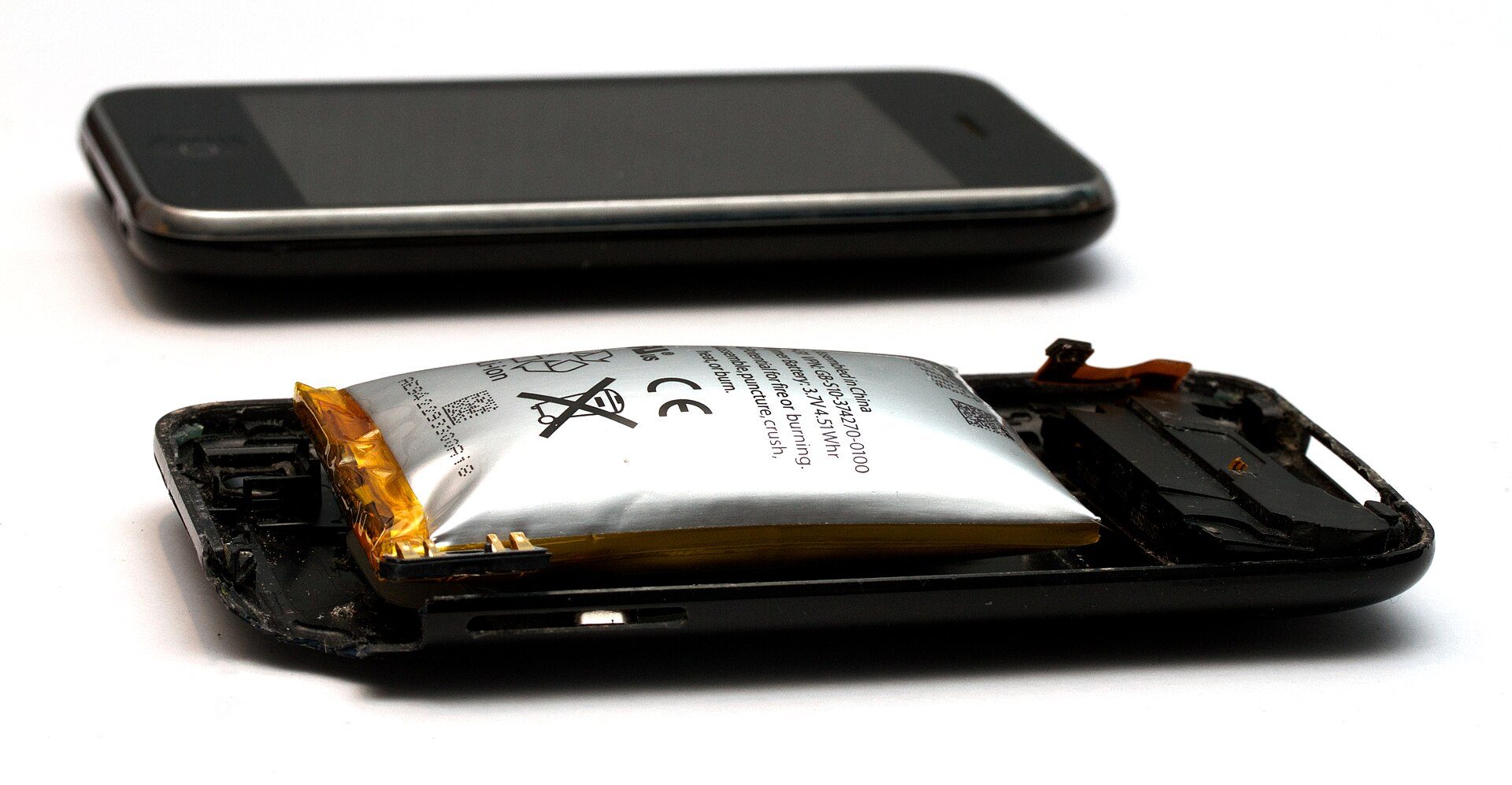
Photo: Mpt-matthew / Wikimedia Commons, CC BY-SA 3.0
Lithium battery safety at the counter
A phone battery holds enough energy to burn violently if it is punctured, bent or short-circuited. A lithium battery fire can sustain itself, gives off toxic smoke and can reignite after it seems to be out. Every battery bench must be prepared in advance, not after something goes wrong.
Safety warning: always discharge the battery below 25% before opening the phone — the fuller the battery, the more violently it burns if punctured. Disconnect the battery connector from the board first, immediately after opening the phone. Never use screwdrivers, knives or metal tweezers to pry a battery; use only plastic cards and plastic tools. Do not bend or fold the battery while removing it. The bench must have a metal tray or a box of dry sand, a suitable fire extinguisher within reach and good ventilation, with no paper or solvents near the battery area. If a battery starts smoking: use insulated tongs to put the phone in the sand box, move people away and open doors and windows; if the fire spreads to surrounding objects, evacuate and call the fire service (114 in Vietnam). Never throw old or swollen batteries in ordinary rubbish.
Preparing the bench
- An anti-static mat and an earthed anti-static wrist strap.
- A lidded metal box holding about 3–5 cm of dry sand, placed by your dominant hand; a metal tray for removed batteries.
- A fire extinguisher suitable for electrical equipment near the exit; the battery area kept away from paper, alcohol and flammable glue.
How to use the sand box
Dry sand cannot stop the reaction inside the cell, but it stops the fire spreading, absorbs heat and keeps the battery from being thrown around. When a battery starts smoking, put the whole phone or battery in the box, pour more sand over it, rest the lid loosely so gas can escape, and carry the box to a ventilated area outdoors. Leave it for at least a few hours before handling it further, because the battery can flare up again.
The technician's battery replacement process
The process below applies to most phones with glued-in batteries. Every model has its own disassembly order (opening from the screen or from the back, long and short screws, which cables cover the battery connector), so always check the repair guide for the exact model before you start.
Tools you need
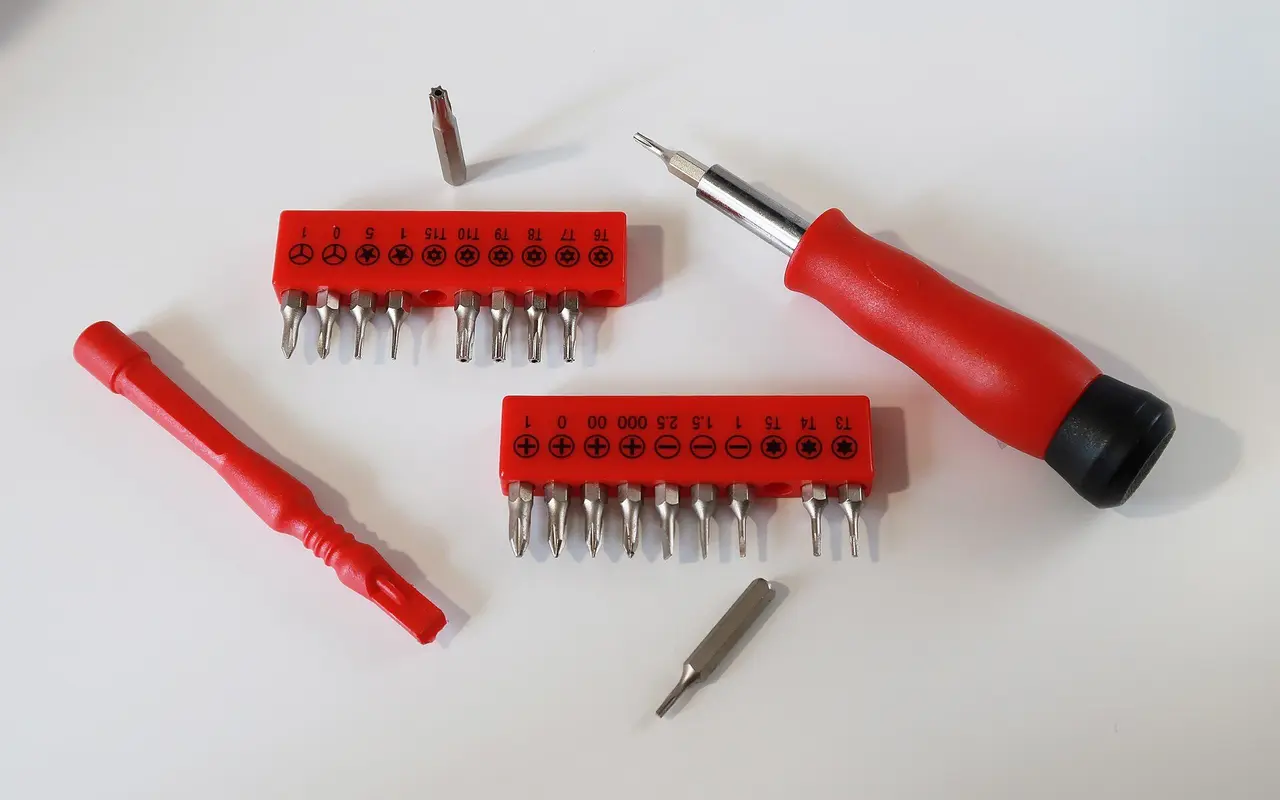
An opening kit with small screwdrivers matching the screws (pentalobe, tri-point, Phillips, Torx), plastic spudgers, thin opening picks, a suction cup and plastic-tipped tweezers (Figure 2). Add a heat pad or a temperature-controlled hot-air station, high-concentration isopropyl alcohol (usually 90% or higher) to soften adhesive, new battery adhesive and a waterproof seal for the model, and a USB current meter to check charging after the swap.
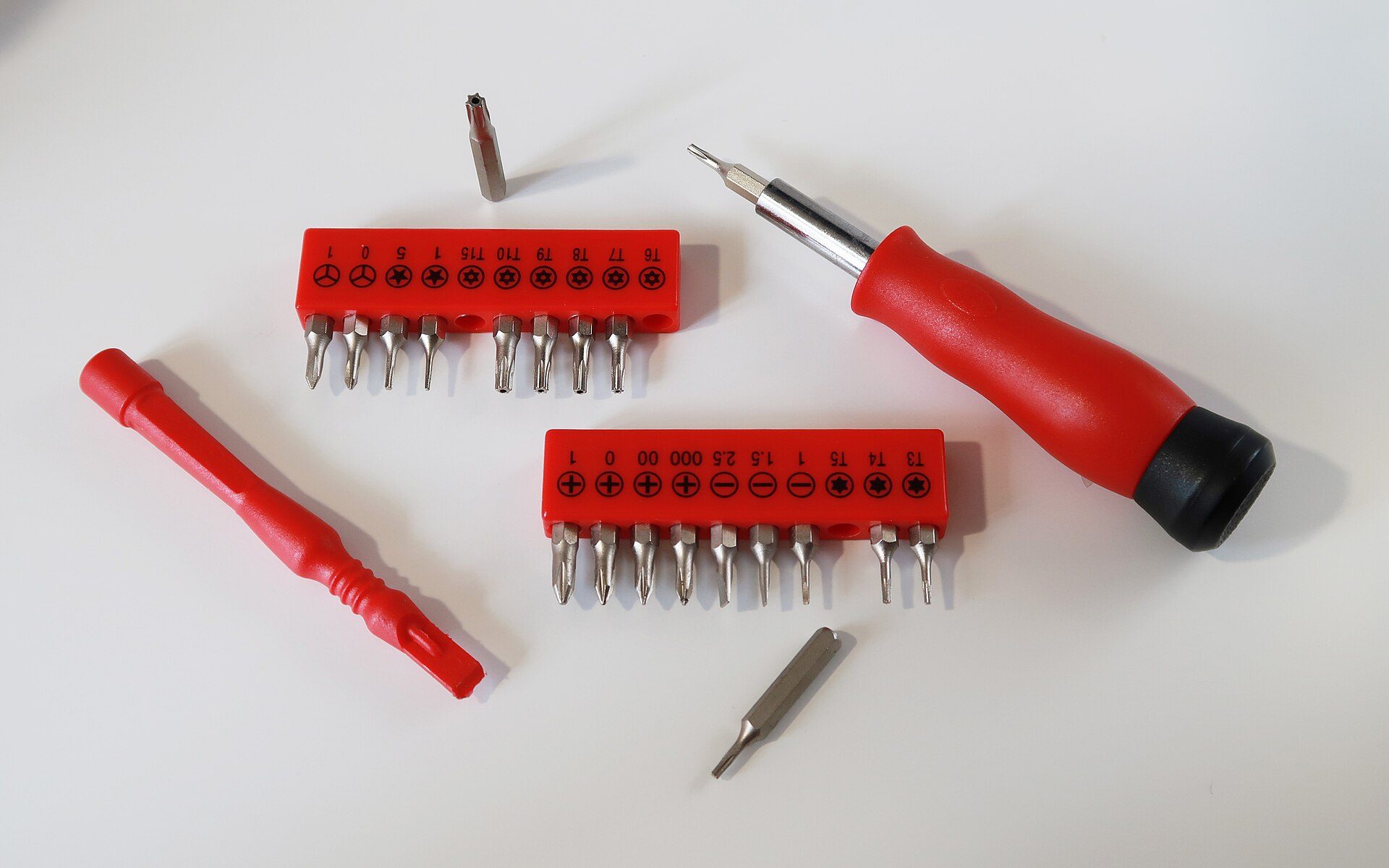
Photo: DiversionForARainyDay / Wikimedia Commons, CC BY-SA 4.0
Replacement steps
- Intake: inspect and record the phone's condition, Face ID/fingerprint, cameras, speakers and charging; photograph the phone; ask whether the customer has backed up their data.
- Discharge below 25%: if the phone is above 25%, turn the brightness to maximum and play video until it falls below that level. Do not charge a swollen phone any further.
- Power off, remove the SIM tray, open the phone: warm the adhesive around the edge at a moderate temperature as the guide specifies, use the suction cup to create a gap, slide a plastic pick in to cut the adhesive; do not insert it deep enough to touch cables.
- Disconnect the battery first: remove the connector bracket and lift the battery connector with a plastic spudger. From now on the phone has no power.
- Release the battery adhesive: if the battery uses stretch-release pull tabs, pull them slowly, parallel to the battery and at a low angle; if a tab snaps, put a few drops of alcohol along the edge of the battery, wait for the adhesive to soften, then ease the battery up gently with a plastic card. Some newer models use the manufacturer's own adhesive-release method — follow the official repair documentation.
- Lift the battery out and put it straight into the metal tray. Inspect the old battery: dents, a sweet smell or rising heat are danger signs.
- Clean and fit the new battery: remove old adhesive, apply new adhesive, seat the battery in place, and connect the battery last, after all other cables are connected.
- Test before sealing: power on, check charging, touch, cameras and Face ID/fingerprint; then fit a new seal, press it down evenly and refit the bottom screws.
Figure 3 shows an opened iPhone: the screen on the left, the logic board and battery on the right, with the battery connector on the board near the edge of the battery.
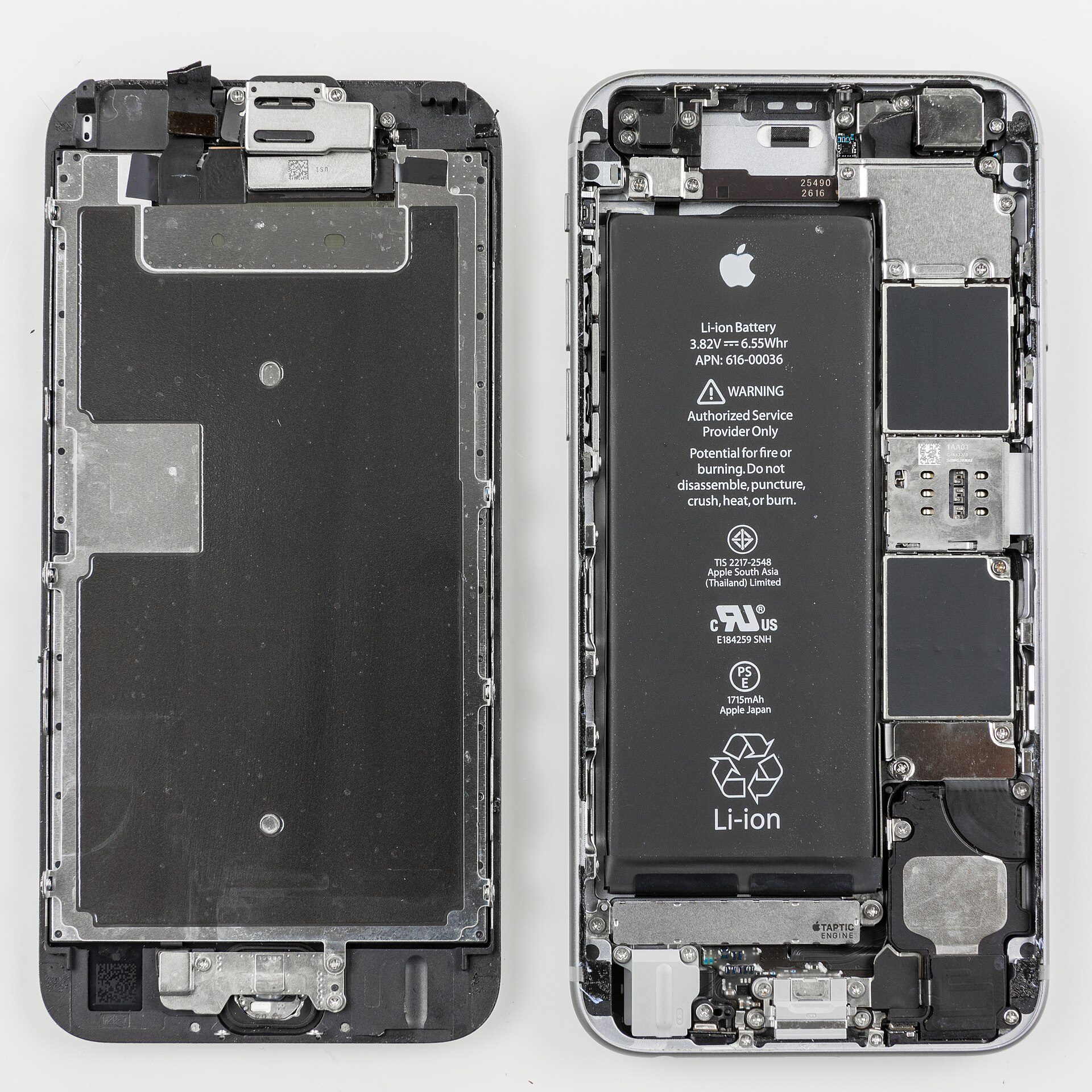
Photo: Raimond Spekking / Wikimedia Commons, CC BY-SA 4.0
Things you must never do
- Never slide a screwdriver, craft knife or metal tweezers under the battery to pry it.
- Never bend the battery to "peel" it out faster.
- Never point hot air directly at the battery itself.
- Never connect the battery before the display and sensor cables are connected.
Swollen or smoking batteries: what to do
Swollen batteries frighten new technicians, but handled correctly they are far safer than letting the customer keep using the phone. Figure 4 shows a swollen battery from the side: the middle is several times thicker than the edges.
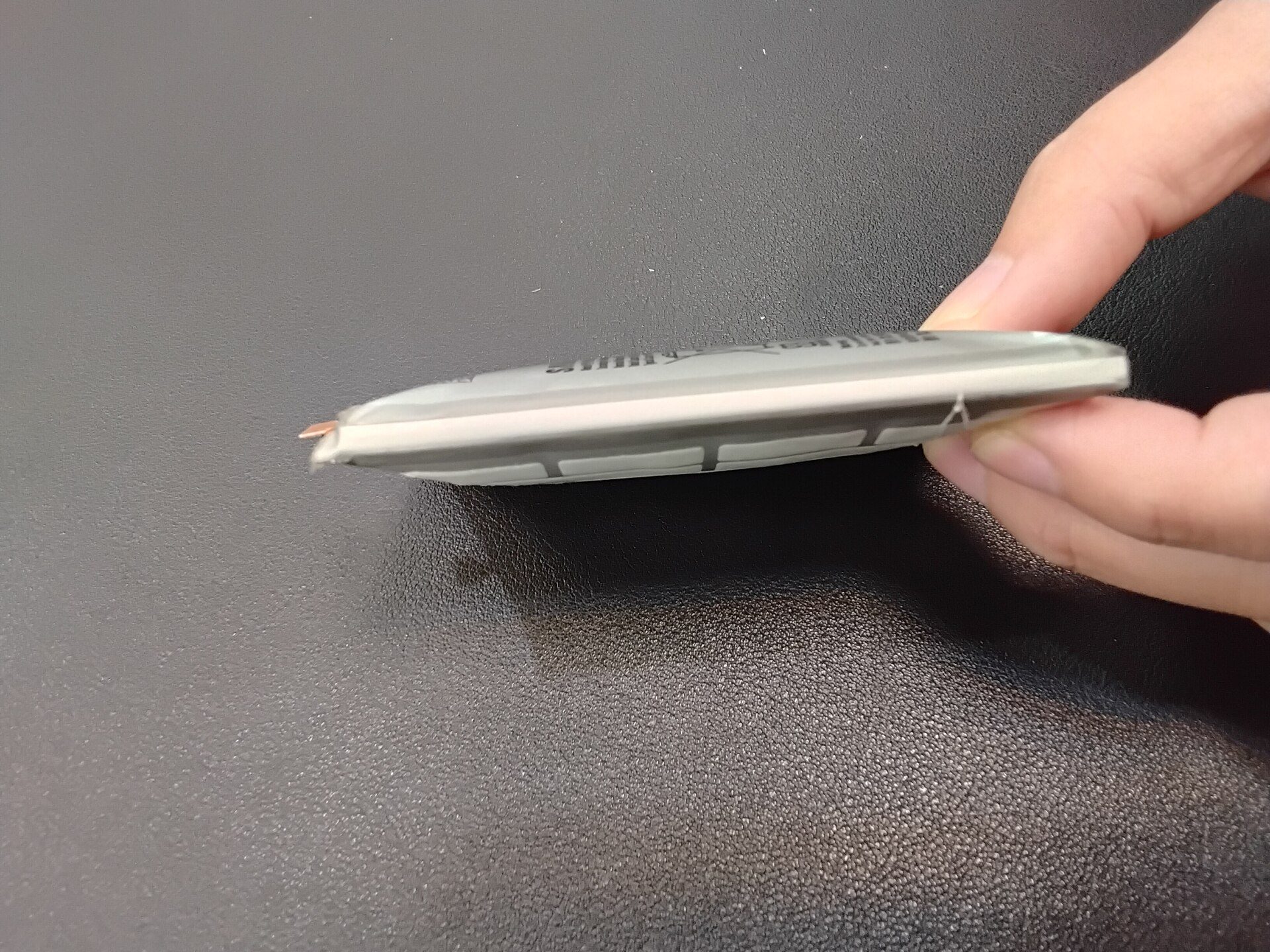
Photo: Saimmx / Wikimedia Commons, CC0
Replacing a swollen battery safely
Do not charge it and do not press down on the phone. If the screen has already been pushed open, open the phone from the side that is already lifted, and avoid sliding tools over the battery. Disconnect the battery first, then release the adhesive gently; swollen batteries often come away more easily. Put the battery in the metal sand box as soon as it is out.
When a battery smokes or catches fire
Signs: a hissing sound, white smoke, a sharp smell, the battery heating up quickly. Drop your tools, use insulated tongs or heat-resistant gloves to put the phone in the sand box, leave the area, ventilate and do not breathe the smoke. If someone is burned or has inhaled smoke, move them to fresh air and call an ambulance (115 in Vietnam); if the fire spreads, call the fire service (114).
Disposing of old batteries properly
Keep old and swollen batteries in a metal box with insulating tape over the connectors, and take them to a battery or e-waste collection point, a manufacturer take-back scheme or an electronics retailer's collection bin. Never put them in household rubbish, because a compacting rubbish truck can set a battery on fire.
Genuine or aftermarket battery?
Customers often ask whether the battery is "original". You must explain the options honestly, because quality and user experience differ noticeably.
| Battery type | Advantages | Disadvantages |
|---|---|---|
| Genuine battery fitted by the manufacturer or an authorised service centre | Correct specifications, the phone shows full battery health, clear warranty | Higher price, sometimes a wait, the phone must be left in |
| Good-quality aftermarket battery from a reputable supplier | Moderate price, fast replacement at the shop | Quality varies by batch; an iPhone may report an unverified battery |
| Cheap "high-capacity" battery | Cheap, advertises a large mAh figure | Real capacity is often below the label, tends to swell early |
Advising the customer correctly
Write the battery type clearly on the repair sheet and never call an aftermarket battery "original". With iPhones, warn the customer in advance that a battery message may appear and the health percentage may disappear. Some shops use dedicated programmers to copy battery data, but they must still be honest with the customer about the battery type. If the phone is still under the manufacturer's warranty, advise the customer to go to the service centre first.
What warranty to offer
Shops typically warranty a good aftermarket battery for about 3–12 months depending on the supplier. The warranty does not cover water damage, drops or swelling caused by poor-quality chargers — spell out these conditions on the repair sheet.
Worked example: an iPhone 12 that shuts down at 20%
Mr Tuan brings an iPhone 12 to the counter: it often shuts down at about 20%, especially when he opens the camera. Battery health reads 76% with a message recommending service. The phone is not swollen and the screen is sealed. The prices below are 2026 references for Vietnam and vary by region; 100,000 VND is roughly 4 USD.
Assessment and remaining capacity
The iPhone 12 battery has a design capacity of about 2,815 mAh. At 76%: 2,815 × 0.76 ≈ 2,140 mAh, so it has lost about 675 mAh compared with new. Combined with the shutdowns at 20%, the conclusion is clear: the battery is badly worn and should be replaced.
Steps and timing
- Intake, condition record, function check, customer confirms the backup: 10 minutes.
- The phone is at 18% (below 25%), so no further discharge is needed; power off, prepare the bench and sand box: 5 minutes.
- Open the phone, disconnect the battery, release the adhesive, put the old battery in the metal tray: 25 minutes.
- Clean off old adhesive, apply new adhesive, fit the battery, connect it last: 10 minutes.
- Power on, test functions, fit the seal, measure the charging current: 15 minutes.
Total time: 10 + 5 + 25 + 10 + 15 = 65 minutes.
| Item | Reference cost |
|---|---|
| Good-quality aftermarket battery for iPhone 12 | 550,000 VND |
| Labour | 100,000 VND |
| New battery adhesive and waterproof seal | 50,000 VND |
| Total | 700,000 VND (about 27 USD) |
The technician writes on the repair sheet: aftermarket battery, 6-month warranty, the phone may show an unverified battery message; if Mr Tuan wants a genuine battery, he is referred to an authorised service centre at a higher price.
Phone battery replacement prices (2026 reference)
The prices below include the battery and labour; they are 2026 references for Vietnam and vary by region, model and parts source.
| Phone and battery type | Price range |
|---|---|
| Mid-range Android, aftermarket battery | 250,000–700,000 VND |
| Flagship Android, aftermarket battery | 600,000–1,500,000 VND |
| iPhone, good-quality aftermarket battery | 400,000–1,200,000 VND |
| Genuine battery at the manufacturer or an authorised centre | about 1,000,000–3,500,000 VND depending on the model |
When the customer should go to a service centre
When the phone is still under warranty, when it is a new model with no good aftermarket battery available yet, when it is a premium water-resistant phone and the customer wants to keep the factory seal, or when the customer needs an official invoice. For older phones out of warranty that need a same-day fix, an independent shop has the advantage.
Frequently asked questions
At what battery health percentage should I replace the battery?
Usually below about 80% is the point to consider a replacement, especially if the phone shuts down unexpectedly or slows down. If health is above 85% and the battery still drains quickly, check background apps, screen brightness and weak signal first.
Will a swollen battery go back to normal?
No. The gas produced inside cannot escape; pressing it flat or puncturing it can easily start a fire. Stop charging and take it to a shop for replacement straight away.
Will I lose my data when the battery is replaced?
A correctly done battery replacement does not erase data, but you should still back up first, because every time a phone is opened there is a small risk to cables and the board.
Is the phone still water-resistant after a battery replacement?
Only partly, and only if a new seal for the exact model is fitted and pressed down properly. Advise customers to keep the phone away from water after it has been opened.
How much does a phone battery replacement cost?
For reference in Vietnam in 2026: about 250,000–700,000 VND for a mid-range Android, about 400,000–1,200,000 VND for an iPhone with an aftermarket battery; a genuine battery at an authorised centre costs more, depending on the model.
Practice exercises and self-assessment
- On 3 phones (at least 1 iPhone and 1 Android), read and record battery health, the cycle count if available, and the usage symptoms.
- Under a senior technician's supervision, replace the battery in an old scrap phone: discharge below 25%, disconnect the battery first, release the adhesive without bending the battery.
- Set up your own bench with a sand box, metal tray and fire extinguisher; photograph it and have the senior technician approve it.
- Write a repair sheet following Mr Tuan's example: remaining capacity, time, quote, battery type and warranty conditions.
Self-assessment criteria
- Pass: the battery is below 25% before opening, the battery connector is the first thing you disconnect, only plastic tools touch the battery, and the old battery goes into a metal tray.
- Pass: your repair sheet calculates the remaining capacity correctly, the total time and total cost add up, and the battery type is stated clearly.
- Not yet: you pry the battery with metal, bend it, open a phone with a full battery, or call an aftermarket battery "original".
Once you can replace batteries confidently, you are ready for the next step of the roadmap: Glass refurbishing, software & data recovery — including backing up customer data properly before every repair. See the 8-step phone repair technician roadmap.